RSVP by Text: Quick Templates and a Host Setup Guide

RSVP by Text: Quick Templates and a Host Setup Guide

Yes, RSVP by text can work well, and for many casual and mid-size events it is a convenient option. If you’re a guest, reply now with your name, a clear yes, no, or maybe, and your total headcount. If you’re hosting, your next move depends on size: direct replies for a small gathering, a short RSVP link for a medium event, or a text-to-RSVP service for anything larger where tracking matters. The templates and host checklist below cover both sides.
Key Takeaways
Structured text replies with name, answer, and headcount cut confusion, and pairing that format with the right collection method scales cleanly from a dinner party to a wedding of 300.
| Point | Details |
|---|---|
| Use the three-element reply | Guests should text name, yes/no/maybe, and headcount in one message. |
| Match method to event size | Direct replies for small groups, a link for medium events, a service for large ones. |
| Set the deadline on the invite | Put the reply format and RSVP deadline in the same sentence guests read first. |
| Plan reminders and tracking | Schedule reminders, review incoming replies, and update one consistent RSVP record. |
| Use TextMyGuests for messaging | TextMyGuests offers a dedicated event number, scheduled and instant messages, guest groups, co-host access, and one organized reply stream. Hosts track RSVP status separately. |
Table of Contents
How Do You RSVP by Text the Right Way?
A clear RSVP text needs exactly three things: your name, a straight yes/no/maybe, and how many people are coming. Skip any of those and the host has to text back and ask, which defeats the whole point of texting in the first place.
Casual (friends, family, informal get-togethers):
-
“Hey! It’s Jenna, yes I’ll be there, just me.”
-
“It’s Marcus, count me and my partner in, so 2 total.”
-
“This is Priya, sadly can’t make it this time.”
Formal (weddings, showers, milestone events):
-
“Hi, this is Danielle Torres. We accept with pleasure and will be a party of 2.”
-
“This is the Alvarez family regretfully declining, but wishing you both the best.”
Workplace or organized events:
- “Sam Chen here, confirming attendance for the Thursday offsite, will bring no guests.”
Plus-one and late replies:
-
“It’s Alex, yes, and I’d like to bring a plus-one, so 2 total.”
-
“Sorry for the late reply, this is Kim, yes I can make it, just me.”
If an invite asks you to text a keyword, like “text YES to 555-0142,” send that exact word first. Some dedicated RSVP systems use keyword rules, so follow the platform’s exact instructions. Do not assume a standard SMS reply is being parsed automatically.
Which RSVP Collection Method Fits Your Event?
Hosts have three real options, and picking the wrong one is how spreadsheets turn into chaos by week two.
Direct replies to your personal number. Works fine for a dinner party of 10 to 15 people. No setup, no cost, but you’re manually tracking every “yes” in your notes app, and typos or duplicate texts create confusion fast.
A short RSVP link texted to guests. For medium and large events, texting a one-click form link instead of asking for a typed reply cuts manual tracking dramatically. Guest details, plus-ones, and dietary notes land in a dashboard automatically instead of scattered across your inbox.

A dedicated RSVP automation service. For formal events, large guest lists, or anything where you need structured responses, reminders, and reporting, a service that explicitly supports those features may be worth the setup time. Capabilities vary by provider.
Quick workflows:
-
Small gathering: text the invite, wait for a reply, log it in a note.
-
Medium event: text the invite with a short RSVP link, check the dashboard weekly.
-
Large or formal event: if you use a dedicated RSVP automation platform, configure its supported workflow; otherwise assign a host to review and log replies.
For anything bigger than a small dinner, pairing texts with a link is usually the path of least resistance.
What Should Go on the Invite for Structured Replies?
Your invite text needs five things: who’s hosting, what the event is, when it happens, exactly how to reply, and the RSVP deadline. A simple formula works best: name the event fast, give one clear action, and cut friction.
Sample host prompt to paste into your invite:
- “Reply with your name, YES or NO, and your headcount by June 3.”
Logistics to lock down before you send anything:
-
Decide on a dedicated number or platform before the first invite goes out.
-
Decide whether you will confirm receipt manually or use a dedicated RSVP platform that explicitly supports automatic confirmations.
-
Schedule one reminder text about a week before your deadline.
-
Choose where the host will track replies (a spreadsheet, guest-list tool, or dedicated RSVP dashboard) before replies start piling up.
To avoid double counting, ask every guest to state their full headcount in one message rather than sending it in pieces. Spell out your plus-one policy on the invite itself so nobody assumes they can bring a guest who isn’t accounted for.
Pro Tip: Put the reply deadline in the same sentence as the instructions, not a separate line. Guests skim texts, and a deadline buried below the fold gets missed.
How Do You Track and Manage Text RSVPs Without Losing Your Mind?
Manual tracking works if you build one spreadsheet with columns for name, phone number, RSVP status, headcount, and notes, then update it when a reply lands. Dedicated RSVP platforms may parse keyword replies and send autoresponders, but only when those capabilities are explicitly supported and configured. TextMyGuests keeps guest replies together; it does not automatically convert reply text into structured RSVP records.
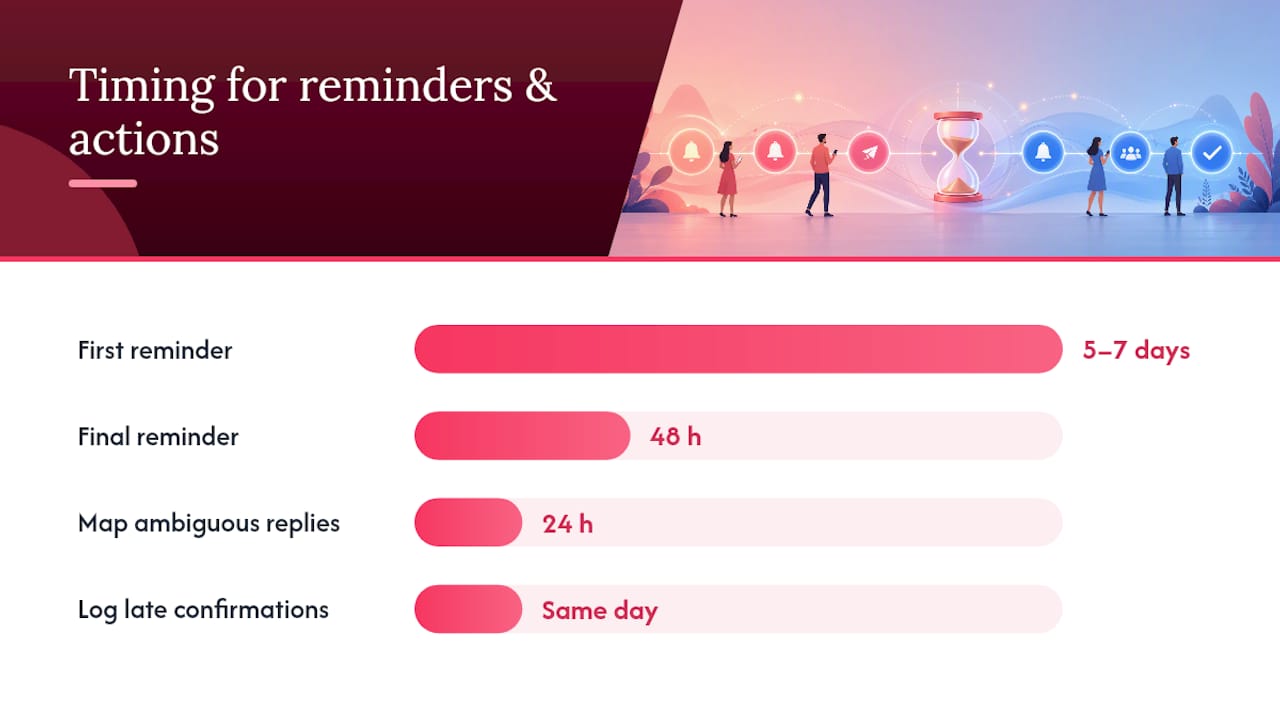
Choose reminder dates that fit your event and deadline. With TextMyGuests, the host identifies nonresponders from their own RSVP record, selects the appropriate guests or group, and schedules a short reminder; TextMyGuests does not automatically detect nonresponders.
Messy replies happen constantly. Someone sends a thumbs-up emoji, someone else replies “for sure!!” instead of “yes.” Build a habit of mapping ambiguous replies back to your guest list within 24 hours, while you still remember who sent what.
-
Use consistent status labels: Confirmed, Declined, Pending.
-
Flag emoji-only or vague replies for a quick follow-up text.
-
Log late confirmations the same day they arrive, not in a weekly batch.
Pro Tip: Structure your tracking sheet or RSVP-system export with five columns every time: name, phone, RSVP status, headcount, dietary notes. Consistent columns make it painless to hand the list to a caterer or venue coordinator later, as detailed in this catering brief for corporate events.
What Features Matter in a Text RSVP Service?
When evaluating a dedicated RSVP automation service, look for the capabilities your event needs: keyword workflows, structured RSVP fields, exportable reports, reminders, guest import, segmentation, and opt-out handling. These are selection criteria for RSVP-specific products; they are not all TextMyGuests features.
A dedicated number keeps your personal cell private and can keep every reply in one organized stream instead of scattered across group chats. If a separate RSVP platform advertises automation, verify exactly how it identifies nonresponders and records status before relying on it.
TextMyGuests is built for event communication. It provides a dedicated event number for privacy, scheduled and instant one-to-many messages, guest groups, co-host access, and one organized reply stream. GuestSnap handles event photo collection as a separate feature. The host still reviews RSVP replies and updates a spreadsheet, guest list, or dedicated RSVP system.
-
Dedicated event number for privacy and organization.
-
Scheduled messages and real-time broadcasts.
-
Guest replies in one stream; RSVP status is not parsed automatically.
-
GuestSnap for separate event photo collection.
To test guest communication before your next event, use TextMyGuests to set up an event, import guests, and try the reply workflow with a small group before sending broadly.
Is It Legal to Collect RSVPs by Text?
This is best-practice guidance, not legal advice, so check with counsel on anything specific to your situation. That said, a few habits protect you and improve deliverability. Get explicit opt-in before adding anyone to a messaging list, and always give a clear way to opt out.
Some platforms document Text-to-Join account-registration requirements, but consent, registration, opt-out, and recordkeeping requirements vary by message type, platform, carrier rules, and jurisdiction. Do not assume a reply such as “Yes” creates sufficient marketing consent; document the applicable consent and honor opt-outs such as STOP.
-
Get opt-in consent before sending non-essential updates.
-
Include opt-out instructions in your first message.
-
Avoid promotional content unless guests agreed to it.
-
Follow your platform, carrier, and legal registration requirements.
Why Structured Replies Beat Guesswork Every Time
Texting has become the default way people communicate, so RSVPs by text were inevitable, not a shortcut. What surprises most first-time hosts is how much friction disappears the moment you specify a reply format upfront. A vague “let me know if you’re coming” invites vague answers. A structured prompt tends to produce more consistent reply text, which the host can record more easily.
The instinct to handle everything manually makes sense for ten guests and becomes a liability past thirty. Use structured reply prompts, then choose messaging and RSVP-specific tools based on the amount of manual tracking you can support.
Ready to Simplify Your Next Guest List?
Missed replies, duplicate headcounts, and guests texting your personal number at midnight are the three problems that push most hosts toward a dedicated tool. TextMyGuests reduces the need to use a personal number or scattered group chats by providing a dedicated event number, scheduled and instant messages, and an organized reply stream. It does not automatically resolve duplicate headcounts or set RSVP status, so the host still maintains the guest record.

Set up an event by importing your guest list, preparing a scheduled invite or reminder, and deciding where RSVP status and headcounts will be recorded. Replies arrive in one organized stream, while GuestSnap separately collects event photos. Test the workflow with a small guest group before sending broadly.
Frequently Asked Questions
Do guests need an app to RSVP by text? No app is required to reply through standard SMS, although availability still depends on the guest’s phone and mobile service.
Can hosts remind guests who haven’t responded? A host can send reminders, but TextMyGuests does not automatically identify nonresponders. Update your RSVP record, select the guests or group still pending, and schedule the reminder. Dedicated RSVP platforms may offer automated nonresponder segments.
What details can be tracked through a text RSVP? TextMyGuests preserves the reply text and phone context but does not automatically parse those details into RSVP fields. The host can record name, status, headcount, dietary details, and plus-one notes in their own system; RSVP-specific tools may structure them automatically.
Is texting appropriate for a formal wedding RSVP?Texting is widely accepted for casual and informal events; for formal weddings, follow whatever method the couple specifies on the invitation.
Sources
-
How to RSVP by text (best responses & etiquette) | Jotform Blog
-
How to Set Up RSVP by Text or Email (Free, 2026 Guide) | Formester
-
Enable Text to Join to grow your contact list — Constant Contact Knowledge Base